Frontend High-Level Design
Author(s): Jenny Sims, Seth Whitman
Reviewers: Aidan Schreck, Naima Zida-Brown, Taichen Rose
Date: 2025-09-22
Status: Under review
Doc Owners: Jenny Sims, Seth Whitman
Revision History
| Date | Version | Authors | Change |
|---|---|---|---|
| 2025-10-20 | 0.1 | Jenny Sims, Seth Whitman | First Design Review |
Problem Statement
This document outlines at a high level how the frontend functionality will be designed and implemented for PeerRated.
Requirements
Functional Requirements
- The website needs to be hosted so users can access the website globally.
- Developers understand the file and folder structure for frontend.
- The website should pass all tests before any new deployments are made.
- The website shall be able to access backend information and integrate that with the frontend to show the client.
Non-Functional Requirements
- Website pages should load within 2 seconds.
- All website traffic must be encrypted via HTTPS.
- The website should have accessibility features built-in, like keyboard navigation and color contrast.
- The website should be responsive for mobile devices.
- The website should achieve 99% uptime.
- The website should display user-facing messages in the case of errors or downtime.
Assumptions
- The website will be implemented using React.
- Our CI/CD is done through GitHub Actions, based on the CI/CD DevOps document.
Architecture Overview
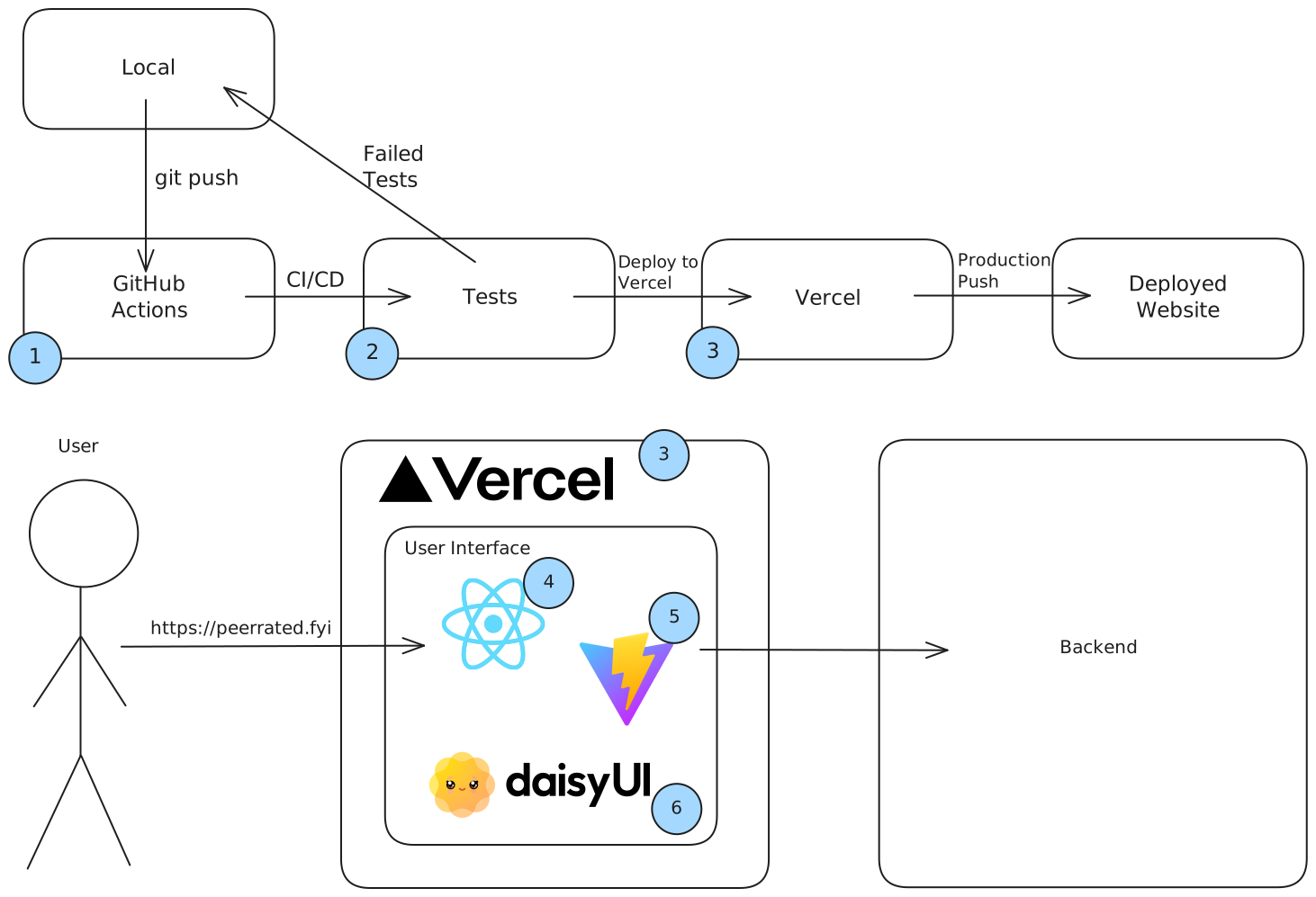
- We are using GitHub Actions for CI/CD.
- The pushed changes will undergo the testing we outline below; if it fails, it goes back into development.
- We are using Vercel to host our website.
- We are using React for the User Interface.
- We will use Vite as our React framework.
- We will style the website with daisyUI.
Design Alternatives
Hosting Platform
Option 1: Vercel [RECOMMENDED]
Pros
- Has free plan
- Has automatic CI/CD if we choose to migrate to it
- Has DDoS mitigation and web application firewall
- Has PR previews
- Best for Next.js/React and server-side rendering (SSR)
- Used it for PeerRated Documentation
Cons
- We likely don’t need all of the features it provides – could have bloat in that respect
Option 2: Netlify
Pros
- Has free plan
- Can deploy from Git or API
- Has PR previews
- Has native form handling, identity management, and A/B testing
- Best for static websites
Cons
- Has 300 credit limit / month, with credits dictating deployments, compute, bandwidth, etc.
Summary
We decided to choose Vercel over Netlify. Both have good options, especially with the PR previews in their free plans, but the credit limit in Netlify is not ideal. If the project expands and requires more bandwidth, or something else that requires credits, we don’t want to have to worry about staying under 300 credits per month. Vercel also has a few more features that could be nice, like the automatic CI/CD. If we choose to migrate from GitHub Actions, we’ll have this option to fall back on.
React Framework
Option 1: NextJS
Pros
- Integration with Vercel
- Specialized in SSR
- Would be nice to save users time when loading website
- Also increases SEO because Google doesn’t have to load the site itself
- Full-stack framework
- Hybrid rendering of both static site generation and SSR on per-page basis
- Has React server components, limiting amount of client-side JavaScript sent to browser
- API routes that allow backend logic – runs own server that hosts its own API
- Will not be using this as the backend has decided to use a different API
Cons
- Lots of features that we may not need/use
- SSR is not needed, taking away a lot of the draw to Next.js
- Very opinionated
Option 2: Vite [RECOMMENDED]
Pros
- Lightweight
- Leads to faster development and better resource usage
- Best for reduced server complexity
- Fast startup time
- Only compiles code that has changed, so a full-build isn’t needed to see changes; this makes it faster than Next.js
- Hot Module Replacement that allows changing modules and seeing it update on app without full page reload
- Instant server start regardless of project size
- Uses on-demand file serving, so doesn’t need to bundle entire application before launching server
- Supports SSR
- Has plugins for other features that we may want
- Better if backend team have a separate server in mind
Cons
- Not as robust as Next.js
- Have to set it up compared to Next.js having things “out of the box”
- Doesn’t come with built-in routing, so would need React Router or similar
Summary
We have chosen Vite because it gives the same functionality as Next.js without having as many features that we will likely not use. Next.js was highly considered for its support with server-side rendering, but Vite has that same capability with better development speeds. If we do end up needing more features, Vite also has support for different plugins to use. We will need additional tools, like React Router or similar, for routing, but it is ultimately a small drawback.
Other Considerations
Styling/UI
We have decided to use Daisy UI to style our project. Tailwind is a very customizable CSS framework, but the many classes it uses are both difficult to learn initially and bloats the HTML. Daisy eliminates that by combining Tailwind-type utility classes into more concise components, with the added bonus of having many custom themes to take a look at. We will also use regular CSS when needed.
| CSS Framework | Bootstrap | Material UI | Tailwind | Shadcn | [RECOMMENDED] Daisy UI |
|---|---|---|---|---|---|
| Pros | |||||
| Neutrals | |||||
| Cons |
Testing (WIP)
According to CICD / DevOps Design Doc: Unit tests, integration tests, and E2E testing; tests should be automatic; tests should build the app and test the product
Unit tests
Automatic tests that test the logic of individual components of the code. We will need to write these tests ourselves. Once the tests are written, CI/CD should automatically run them whenever new code is added.
Code coverage
Code Coverage = ((Number of lines of code executed) / (Total Number of lines of code in a system component)) * 100
Code coverage is a common measurement used in software testing, although it seems contested: 1) Code coverage doesn’t account for code being removed; sometimes you may fix an error or a problem by removing code and that actually reduces code coverage—in order to raise code coverage, you would be required to test other code or add unnecessary code. 2) Code coverage measures the amount of code that was tested, but not the amount of code that actually worked properly.
We should not worry about code coverage for now. For the time being just focus on writing tests → https://stackoverflow.com/a/90021
Integration tests
WIP
E2E testing
WIP
Folder Structure (WIP)
This folder structure was originally designed with Next.JS in mind. At the moment, it’s being changed to make it suitable for Vite, but it is still a work in progress.
- /node_modules // This folder will be automatically created by whatever package manager we use. It will contain all external libraries/packages that the project depends on. We will not interact with this folder directly.
- /src // Keeps the application code and config files clearly separated; application code goes inside src folder and config files stay outside
- /assets
- /images
- /styles
- /fonts
- /scripts
- /lib // big, reusable blocks of code go here
- /components // reusable UI components (e.g. buttons, cards, modals, etc.)
- /utils // small, helper functions go here
- If any middleware is used, it should go in root folder/src (NextJS convention)
- hooks // React hooks
- contexts // React context files
- /assets
- Index.html // Main entry point for the entire application
- config files (such as README.md, .gitignore, package.json, vite.config.js, etc.)
- /public // assets not included in source code go here; files that don’t need any processing—no importing or bundling. In many cases, these are large image/video files that we don’t want Vite to process, as well as things like favicon.svg, robots.txt, etc.
- /images
- /videos
- favicon.svg
- etc
https://nextjs.org/docs/app/getting-started/project-structure#organizing-your-project
What files go in which asset folder?
| src/assets | public | |
|---|---|---|
| Performance | Files may benefit from optimizations, but may slow down the app and increase bundle size | Reduced loading time and bandwidth, but files are not optimized, so potential for larger file sizes and lower quality |
| Security | Files are bundled with the code, so “concerns” are harder to separate | Files can be accessed and modified by the public, if they know the URL to them |
| Maintenance | If a file needs to be changed, it can cause errors and maintenance complications | Files can be easily located and updated |
| Dynamic changes | Files can be changed dynamically | Files are static and cannot be changed dynamically |
| TL;DR | Small, dynamic, frequently changed files go here | Large, static, rarely changed files go here. Keep security in mind here!! |
Costs (WIP)
WIP
A11y
The A11y Project aims to make technology and websites accessible, with “a11y” standing for accessibility and the “11” representing the number of letters between “a” and “y” in the word “accessibility”. It has guidelines to follow to ensure that websites are accessible to users with disabilities. We should aim for the website being entirely navigable by keyboard and having appropriate color contrast at the very least. In the staging area, we could do manual tests for keyboard navigation if needed. However, there are tools available to check different accessibility options. These websites both have lists of accessibility tools to check the website, with most being free:
Routing
Routes will be organized with React Router. It is a library that allows the creation of multiple pages, URL parameters and query strings, browser history and navigation, nested routes and layouts, and protected routes for authentication. Browser Router is a component within React Router that enables that functionality. Routes will be grouped as either public or auth, with the auth routes including the log-in and sign-up pages. There will also be an error group to handle any error pages, like 404 or 500. This is a helpful link for more information on routes:
Performance/SEO
SEO (Search Engine Optimization) is the process of improving a website to make its content easily accessible to search engines so the website can become visible to more users (and appear higher in search results). Improving performance improves SEO, as well as implementing server-side rendering (SSR). With SSR, search engines do not have to load the website themselves to know the content on it. This is native to Next.js, but can be built in manually to Vite.
To improve performance, we can use “lazy loading”, which identifies some parts of the website as non-critical, so it only loads those parts when needed. This is especially useful for images. Optimizing the assets we use is also important—we do not want to download a very large/high definition image if a smaller one does the trick. Code splitting is the process of bundling your code into smaller packages that can be loaded independently of each other. This is a native feature in Next.js and Vite. Vercel also has a CDN Cache to cache the website, which caches static files automatically and can be configured to cache dynamic content using Cache-Control headers.
Vercel Cache:
Resource for improving web performance:
Resource for improving SEO using Vite:
Observability
Vercel has built-in web analytics that provides information about visitors, page views, and bounce rate (percentage of visitors that visit and leave immediately). It does not use cookies and only stores anonymized data to protect user privacy, and can be accessed through the platform.
For error tracking, Sentry is a well-rounded tool. It sends alerts for crashes, uncaught exceptions, and other issues that users encounter. We would need to use the Team plan for $26/month (the free plan only allows for 1 user). Vercel has some built-in logging functionality that can be used for error tracking if we want to avoid that cost, but it is not nearly as extensive.
Vercel’s Web Analytics:
Data & State
The server state is the data stored in an external server or API—the backend of the application. React Query (or TanStack Query) can be used to fetch data from the server and render it for the client. The client state is the local data of the application and is not connected to the server/backend. React’s useState can manage the client state.
For more information:
Forms
Forms can be validated in the HTML, though that method may be easily bypassed. Therefore, we will also utilize client-side validation. For the client-side, we will implement JavaScript validation, returning an alert and highlighting the specific field if there is an issue with the form. This feedback will be in real-time, appearing when the user moves to another field of the form or submits it.
Server-side validation is also possible with Node.js, which can be another way to safeguard forms from malicious actors. For forms that need more security, like signing up or logging in, server-side validation will be useful. For other forms, like filling out a review, it may not be necessary.